Anybody Can Just Take Them
Getting an AI executive assistant working in week one is easy. Keeping it working in week six takes seven rules. Part 2 of Building an AI-Native Company.

Here's an uncomfortable truth: AI is now doing work that people used to do for me.
I've worked with some amazing executive assistants over the years, and a lot of what's in this piece I learned from them, figuring out how to work together efficiently. At Point72 Ventures, I traveled 150 days a year, and booking my meetings and handling that much travel took a full-time person. A big firm can afford that. At a small firm, we're a lot more like the startups we support. We can't have full-time support from a world-class EA.
So today Kaya, my AI executive assistant, books about 80 to 85 percent of my meetings without asking me anything. It didn't start that way. For the first couple of weeks things got worse, not better, and I was sending the coordination emails myself, on purpose.
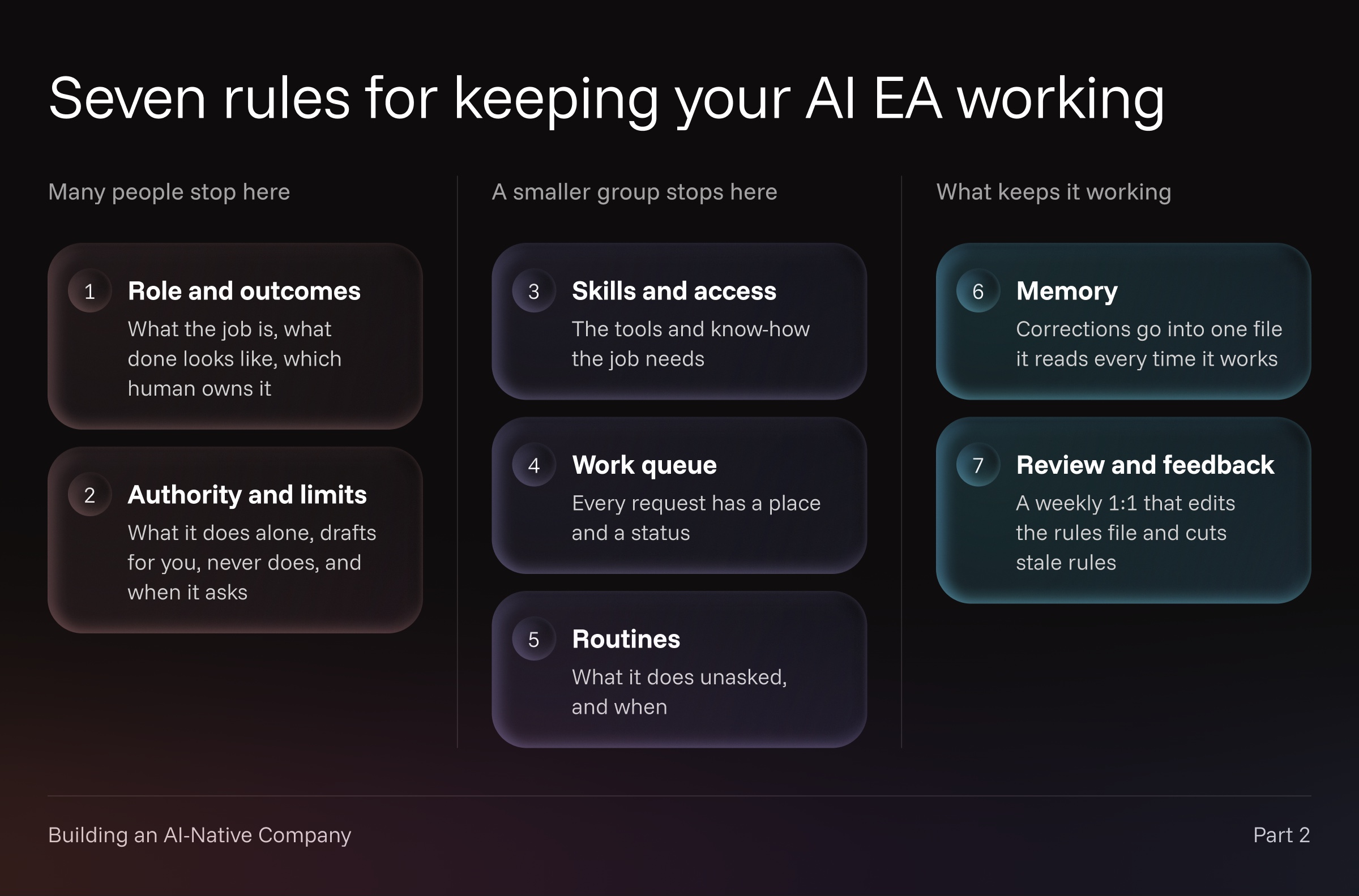
What I learned is that an AI worker rarely fails because the model isn't smart enough. It fails because nobody decided enough up front, and nobody kept deciding after it started. Getting an agent working in week one is relatively easy. Keeping it working in week six takes real work. Jerry Seinfeld said it best at a rental car counter: anybody can just take the reservation. The hard part is the holding. I've created seven rules to help with the holding. They won't stop every mistake. They make each one visible, and fixable once.
Keep last week's one-page rules handy. Below are the seven rules, with Kaya as the example. The full setup guide, with thirteen principles and a prompt that interviews you to write your EA's rules file, is published alongside this piece: How to set up an AI EA.
1. Role and outcomes
Write down what the job is, what done looks like, and which human owns it. Kaya's job is my calendar: get the right people on it, keep the wrong ones off, and protect the time I've set aside. A meeting is done when the invite is on my calendar, not when someone replies "Tuesday works." And I'm the one who owns the outcome, not Kaya. When something goes wrong, nobody has to wonder whose job it is to fix it.
2. Authority and limits
Decide what it does on its own, what it drafts for you, what it never does, and when it stops and asks. Kaya sends only from its own inbox. Anything that goes out from mine, I send by hand. When someone reschedules twice, Kaya stops offering times and asks me.
On day one almost everything was a draft. A kind of message moves to "sends on its own" once I've approved 20 in a row without editing them, and one edit resets the count. Without a rule like that, an agent's scope only grows when you remember to widen it.
Many people stop here, to their detriment. A job description and a permission list feel like enough, because that's what you'd give a new hire. But a new hire shows up knowing how an office works. An agent shows up knowing nothing about yours, so more has to be decided.
3. Skills and access
Give it the tools and the know-how the job needs. Kaya has its own email address, access to my calendars, and templates for the five messages that make up most scheduling email: offering times, confirming, accepting a reschedule, nudging, and offering new times when the old ones are gone. Templates are what let me hand over sending without worrying about how I'll sound. Kaya also says it's an AI. People are fine working with one. They're much less fine finding out later.
People always ask what to run it on. I've tried my EA on a bunch of different setups, and honestly, that choice depends on what you already use and like. The choice that matters more is the model. Use a better one than you think the job needs. Drafting emails from templates sounds easy, but EA work is mostly judgment: who gets the slot, when to push, when to stop and ask. Judgment is exactly what the top-tier models are good at.
4. Work queue
Every request needs a place to live and a status. A scheduling thread can sit for days waiting on one reply, and if the only record is the agent's memory of the conversation, it gets dropped. Kaya holds offered slots for 48 hours and nudges once after two business days. Both only work because every open thread has a status to come back to.
5. Routines
Decide what it does without being asked, and when. Kaya looks ahead each morning for anything that breaks my rules. It batches its questions to me into set times, and my agents hold anything that can wait from 4:00 to 6:30 PM on weekdays. Every question arrives with what I need to answer it from my phone, and Kaya's recommendation first.
A smaller fraction of people stop here. But rules six and seven are what make an agent work for more than a week or two. A lot of the reason bots fall apart after a few weeks is that nobody wired up memory and review explicitly.
6. Memory
While I work with Kaya, I give it rules in passing. One was: you don't need to reintroduce yourself to someone once you've already gone back and forth with them in a thread. It agreed. But that instruction lived in a single conversation, and a few weeks later, in a different thread, it made the same mistake.
A correction that lives in a chat isn't a rule. It has to go into one written file the agent reads every time it works, so it never needs saying twice. I keep those files somewhere I control, not inside any one tool. When I moved my agents to a new platform, they were up to speed right away.
7. Review and feedback
Memory without review rots. I learned this one the hard way. I'd told my EA to save what it learned straight into its core operating instructions, and it did. What I didn't do was read the file. When I finally started reviewing it, it had grown from 2,000 characters to 7,000, with dozens of instructions that contradicted each other and log lines noting where each one came from. All of that is context the agent reads every time it works, and most of it was making the work worse.
Now Kaya and I have a 1:1 every Friday. I look at what got scheduled, what took more than 24 hours, and what got escalated and why. For each escalation I ask one question: which rule would have prevented it? Kaya keeps a log during the week, but the log is a record, not a rulebook. Rules change only when I move them into the file, and that's also when I cut the ones that no longer earn their place.
Where this leaves Kaya
It handles most of my scheduling and escalates well. It's still weak at coordinating several people's calendars at once. That shows up in Friday's review, where I can decide what to do about it.
Start here
Pick whatever setup you already use, with the best model it offers. Take last week's page into the interview prompt in the companion guide. It asks one question at a time, pushes back on vague answers, and turns your page into a rules file your EA can follow. Then run your EA in draft mode for the first couple of weeks, and put the first Friday 1:1 on your calendar before you turn it on.
Next time, in Part 3: choosing your roster. Which agents you actually need, and which are really just skills one agent should carry.
Sources
- How to set up an AI EA, the companion guide to this piece
- There Had to Be Another Way: Building an AI-Native Company, Part 1